by Johnson Yip
on June 30, 2009
in
Computer,
Computer Certifications,
Computer Tutorials,
Hardware Tutorials,
Linux,
Local PC security,
Microsoft Windows,
Networking,
Online Internet Security,
Operating Systems,
Peripherals & Accessories,
Security,
Software,
software tutorial,
System Utilities,
Tech Tutorials
Â
 You have to go to your routors website which usually have a address similar to
http://192.168.1.1/ “Check your routor’s brand website or instructions booklet or CD” . The default password to login to website is usually Username: admin Password: admin
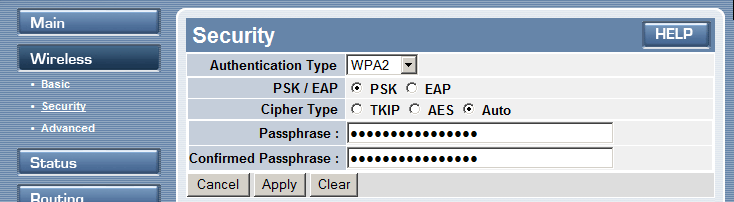
My routor has a link called Wireless and a sublink called security where I can set my password and encryption type for wireless. I recommend you use WPA or WPA 2 since WEP is not as secure as WPA & WPA2
Continue reading to see how to password protect your Wireless network connection
Tagged as:
802.11b,
802.11g,
computer hardware,
encryption,
network,
Networking,
password,
Security,
wep,
wifi,
wireless,
wireless network,
wpa,
wpa 2
by Johnson Yip
on June 29, 2009
Wavasaur is a great program to use to remove vocals/voices from your mp3 sound files. It is easy to use and free for personal use. It has a lot of great features for trimming and editing music and audio levels in Windows. It is similar to Audacity which is a sound recording software which is also free to use.
[continue reading…]
Tagged as:
mp3,
multimedia,
music,
remove vocals,
sound editing program,
Sound/Audio,
Wavosaur
by Johnson Yip
on June 29, 2009
Click on the Wrench icon on the upper left of Opera then click on the star icon.Â
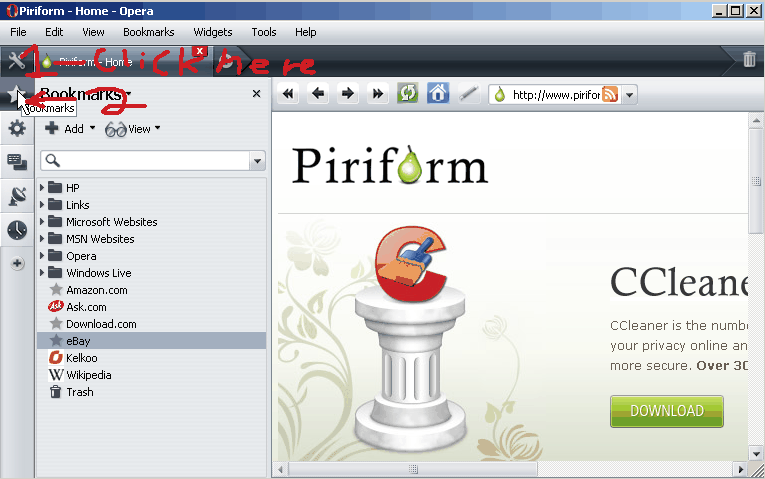
Bookmark bar for Opera button
Tagged as:
bookmark manager,
browser,
Opera,
toolbar,
tutorial