<<Back to Computer Repair + Web design Blog | Computer Topic Categories

How to open bookmark bar in Opera tutorial

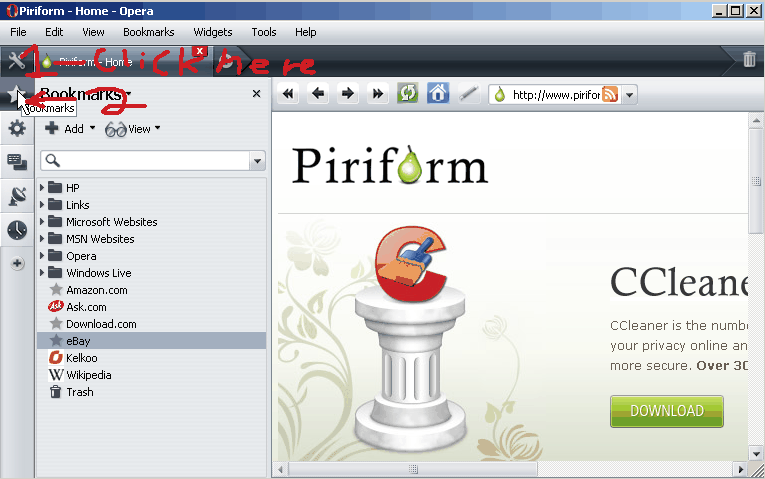
Click on the Wrench icon on the upper left of Opera then click on the star icon. 

Bookmark bar for Opera button

Bookmark bar for Opera button

Share and Bookmark:
  • Digg
  • Yahoo! Buzz
  • Facebook
  • Twitter
  • StumbleUpon
  • Reddit
  • del.icio.us
  • Slashdot
  • FriendFeed
  • MisterWong
  • LinkedIn
  • NewsVine
  • Propeller
  • Google Bookmarks
  • Yahoo! Bookmarks
  • Add to favorites
  • RSS
  • email
  • PDF
  • Print

More Related Tech Posts:

About Johnson Yip

I graduated from Vancouver Community College's Information technology Specialist certificate program in 2008 and became Comptia A+ IT Enterprise technician certified in 2009. I volunteer at a non-profit Computer Recycler and Refurbisher called Free Geek Vancouver. My interest includes computers, gadgets, art, movies, food, television, blogging, forums, websites and Video games. Welcome to my blog on computer, hardware, software, web design, and cms help. Enjoy your stay!
This entry was posted in Computer Tutorials, Software, Tutorials, Web Browsers, software tutorial and tagged , , , , . Bookmark the permalink.

Leave a Reply

Your email address will not be published. Required fields are marked *

*

You may use these HTML tags and attributes: <a href="" title=""> <abbr title=""> <acronym title=""> <b> <blockquote cite=""> <cite> <code> <del datetime=""> <em> <i> <q cite=""> <strike> <strong>

CommentLuv Enabled

Spam protection by WP Captcha-Free