by Johnson Yip
on July 5, 2009
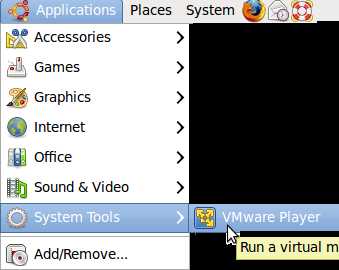
VMware player is VMware’s free virtualization machine software for users to use. It can be used to run Linus, and Windows operating system within a windows in Ubuntu, so you do not have to dual boot your PC. It is very easy to use, but you have to use Terminal to install it in Ubuntu since it is not a .deb file.
Read my tutorial on Installing and using VMware Free Player with Terminal in Ubuntu
Tagged as:
.bundle,
debian,
tutorial,
ubuntu,
ubuntu 9.04,
virtual machine,
virtualization,
vmware,
Vmware player
by Johnson Yip
on July 5, 2009
Monitor cleaning instructions
1. Get eyeglass cleaner, or a Monitor cleaning kit from an electronics, or computer store. You can also get those cans full of paper towels which already have monitor cleaning solution on it.
Never use house hold cleaners like bleach, ammonia, alcohol or other harsh chemicals to clean your monitor since it could break, discolour, or scratch the monitor.
2. Get a clean soft lint-free piece of clothe. Don’t use paper towels since they can scratch your monitor. I recommend cotton or microfibre clothe.
3. apply the monitor cleaning solution to the clothe, but not directly on the monitor since the liquid can get between the monitor and the electronics and short-circuit the display which will break the monitor.
4. Gently wipe the monitor with the clothe, and try not to apply too much pressure since you might break an LCD monitor if too much pressure is apply. Â
5. Wait for the cleaning liquid to dry before turning your monitor on.
Tagged as:
cathod ray tube,
cleaning,
crt,
lcd,
liquid crystal display,
maintenance,
monitor
by Johnson Yip
on July 2, 2009
This tutorial talks about the benefits of saving your picture files as PNG instead of Jpeg, or Gif. Jpegs are only good for Photos with a lot of colours. PNG are good for saving clipart and photoquality pictures as well. It is a very versatile picture format.
But, gif are still the best for animated gifs.
[continue reading…]
Tagged as:
file formats,
gif,
graphic design,
graphic tutorial,
jpeg,
ms paint,
photo editing,
picture files,
picture format,
png,
save