If you manually turn on sleep mode, the log on screen will not show up asking for your password. This means anyone who type on your keyboard or move your mouse will have access to programs and files which are on the Users Windows Vista user account. If the user has an administrator account, the hacker basically has access to everything on the computer unless NTFS permissions or password protected files are denying them access.
The reason for this is because your screen saver which is password protected did not have a chance to turn on the password protected log on screen for Vista because the screen saver is not running when the PC is sleeping.
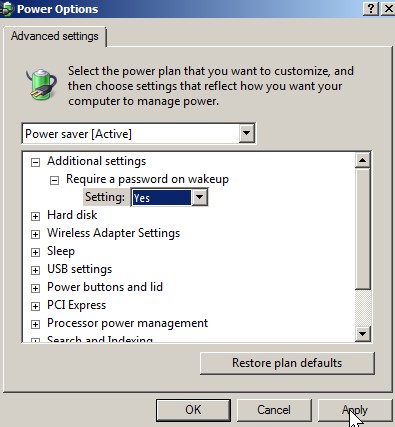
There is a simple fix for this security problem. What you need is to add a password to your current user account,  go to power management, click on advance power management option, and pick Yes for Requires Password on wake up Setting. Click the apply button at the bottom right of the Power Options Window.
Google Chrome OS is an open source operating system for people who spend most of their time on the web built around the core tenets of speed, simplicity and security. This is a demo video to give you a feel for the Google Chrome OS user experience.
It is sometimes difficult to find the short cut to launch system utilities because some are located in All Programs, Control Panel, and other places, but there is a way to make it easier to remember where all the utilities are. The way is to make a short cut on your Windows desktop. Whenever you need to do administrative task like run add/remove program, you can just look for the shortcut on your windows Desktop.