by Johnson Yip
on June 26, 2009
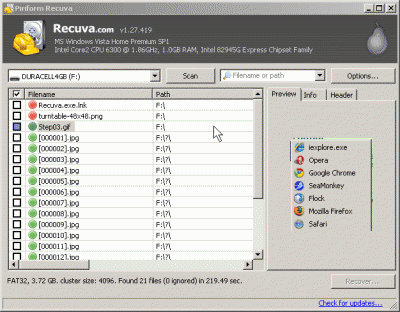
Recuva works pretty well. I can recover all of my files I intentionally deleted on my flash drive very quickly, and it also can recover files after multiple quick format on a flash drive when I use Recuva in Deep Scan mode .I like the preview windows to see the thumbnail of the recovered picture.The multiple view modes are a nice feature since it allows me to view my files in a tree, list and thumbnail structure. It is easy to export the recovered files to my computer.The one major limitation is that it can’t recover files from a flash drives which I did a full format on. What I learned from using Recuva. It is simple to undelete files from drives, and it is also easy to recover files from a drive which been quick formated, but imposible to recover files from a drive that been Full formated with Recuva. It also has a feature to securely overwrite your flash drive files you recover just incase you don’t want anyone to easily recover your files. You can overwrite your recover files with 1 pass, 3 passes, 7 passes, or 35 passes.
Read about the PROs and Cons of Recuva
Tagged as:
ccleaner,
deffragger,
file recovery,
free,
priform,
Recuva,
review
by Johnson Yip
on May 30, 2009
in
Computer,
Computer Certifications,
Computer Tutorials,
Local PC security,
Microsoft Windows,
Online Internet Security,
Operating Systems,
Security,
Software,
software tutorial,
Tech Tutorials

Secure your computer for free
Use an Anti-Virus program.
I recommend is Avast free.
Use a firewall program.
I recommend
Comodo firewall which is free.
Use Anti-Spyware software.
Spybot is a good free Anti-Spyware program.
Update your security software, OS and scan your computer weekly for viruses, spyware, and adware.
Download and buy software and files from trusted sites you know are virus free like download.com or sourceforge.net
Don’t visit websites that seem illegal since they know you would not report them for spreading viruses since they don’t want people to know they downloaded illegal content, so if there is a virus, malware on the website. It is less likely to be reported.
Tagged as:
adware,
prevention,
safety,
Security,
spyware,
virus
by Johnson Yip
on May 14, 2009
1. make a copy of Default.settings.php in /drupal-6.11/sites/default and call the files setings then make sure to make the file permissions 777  for the file.
2. Make a file called php.ini with notepad and put this code in the php.ini file then upload to your drupal root directory.
[PHP]
register_globals = OffÂ
memory_limit = 16MÂ ; Maximum amount of memory a script may consume (16MB)
3. Go to the advance options for the database options, and change it to the host Link 1and1 made for you.
Tagged as:
1and1,
cms,
content management system,
Drupal,
installation tip