≡ Menu

I just learned how to unlock the hidden administrator account in Windows Vista from pcwizkid . I always wonder why there was not an account called Administrator in User Accounts in Control Panel, but I see the account when I set my permissions for registry keys and files. Now I know Vista hides it by default.

First, you have to run your command prompt as an administrator by right clicking the command prompt shortcut, and picking the “Run as administrator” option.
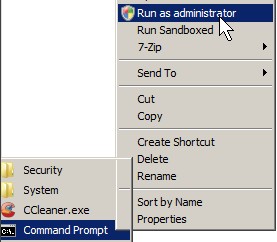
Run Command Prompt as administrator

Run Command Prompt as administrator

Type “Net user administrator /active:yes” without the qoutes, and press enter in Command Prompt

Net user administrator /active:yes

Net user administrator /active:yes

I recommend going into Windows’ Control panel and User accounts, and setting a password for your Administrator Account since anyone can use this trick to hack into your computer with a limited account or possibly guest account by enabling the  Administrator that does not have a password by default account from their non-admin account. This seems like somewhat of a security risk since when I enable my admin. account it was not password protected. Learn how to make a password for your administrator account by reading my tutorial on making a user account password from user accounts.

See PC Tech Whiz video on making the user account for administrator show up on your Vista PC
0 comments
USB

USB

I notice sometimes a computer won’t start up when USB printers, drives, or any other USB hardware is plugged in  and turned on, so if your computer suddenly pauses during start up. It is worth it to turn off your printer, external USB drives, Scanners, webcam, tablets, etc. I’m not sure about firewire causing pauses during start up, but it is  probably possible. I never owned any firewire devices, so I have not tested this out .

If you are using a laptop, and it freezes during boot up, try taking out your PC cards in your PC card slot.

USB, Firewire, E-sata,  Laptop PC cards are all hot-swappable which means you can remove and insert them when the PC is on unlike serial ports.

All you need to plug in during computer start up is ypur key board, mouse, monitor, power, and network. It is okay to unplug all your other devices.

You can try flashing your motherboard BIOS to the latest version to fix this problem, but flashing your BIOS can be risky since if you lose power, or your computer freezes, your motherboard BIOS will be corrupted, and your PC won’t turn on unless your Motherboard has a backup bios.

0 comments
tool

tool

Today I turned on my computer. It kept on restarting because it was at stage 3 of 3 of Windows update at the login screen. When it could not find the files or can’t install them, the computer restarted and tried again and again. It was very frustrating.

To fix this problem of endless reboots, I booted to the HP Recovery Manager by pressing F11, and went to the system restore section by pressing the advance button, and picking a date when my computer was starting normally. I waited for my computer to restore itself to an earlier date and hoped it worked at stopping the constant restart and install cycle. It did work, and now my computer starts regularly. My problem with constant reboots in Vista is gone.

It also might be possible for people to press F8 and go into Windows Safe mode, and do a system restore by going to Start Menu > All programs> Accessories > System Restore to an earlier date. I’m not sure if this work because I used HP version of system restore instead of Windows. If that does not work, you can try uninstalling some Windows Updates in Windows Update if you can get into safe mode.

If all my suggestions fails, you can back up all your files by booting to a Ubuntu Live CD to copy all your files to another drive, or partition, format and do a clean install of Windows. But, it would be very time consuming.

If your computer is fine, I recommend you Image/Clone your hard drive with Clonezilla which is a free hard drive clonning software that boots from a Live CD to clone your drives, so when you need to reinstall Windows or Linux. You can quickly restore your computer to your last clone you made by cloning your drive with the image file clone you made.

0 comments