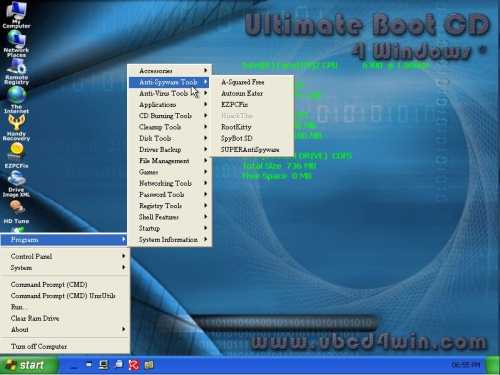
Ultimate Boot CD For Windows is a Bart PE live CD which can be used to fix almost all problems within windows like reimaging a drive, deleting viruses, disk cleanup, disk defrag, disk wiping network testing, and benchmarking. You can download it at http://www.ubcd4win.com/ . It is a great tool for system administrators, and home users. It is free for everyone to use. UBCD4WIN is basically a bootable version of Windows. You can even use it for surfing the web if you want to. It also loads very quickly, so you do not have to wait a long time for it to load. You don’t even need a hard drive for using Ultimate Boot CD for Windows, so it is the perfect booth disk for people have to test a lot of system without working hard drives like computer repair techs, computer refurbishers, etc. There are also a few classic games like solitaire, minesweeper, pinball, asteroids, etc on Ultimate Boot CD you can play to pass time when you are bored. There are a total of 344+ programs on UBCDWIN go to  http://www.ubcd4win.com/contents.htm for a complete list of all the programs not including the Windows’ Computer management, cmd, etc. If you know how to use Windows, and how to use basic programs like disk cleanup, disk defrag, and computer management. You will know how to use UBCDWIN.
Do you find audio books too expensive, and printed text too small to read? If you have a text or word file of a book, you can copy and paste the text and save it as a MP3 file with Clip Speak 1.5 which you can download here:  http://www.codeplex.com/clipspeak . It is very easy to use and fast. Clip Speak is perfect for the student who does not like reading, but would not mind listening to an audio version of his notes he took in class. It is also good for learning pronunciation for English although Clip Speak has a monotoned, and robotic voice, so it is not great at listening to. Clip Speak 1.5 is free. If you want a better voice, you have to look for another text to speak software. The file sizes of the MP3 which clipspeak  make are also small, so you can fit hours of text-to-speak MP3s on a mid-end MP3 player like the 1-4GB MP3 player,Zune or Ipod.
This is my first video tutorial I made with CamStudio. I will make a CamStudio Video Tutorial soon, so come back soon.
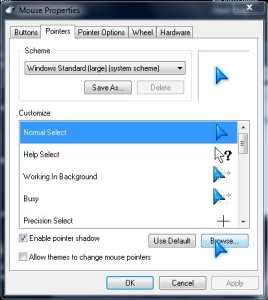
Are you tired of the default black and white mouse cursors which come with Windows. Maybe you constantly have trouble seeing those tiny cursors. To be truthful, I always find the default cursors for Windows kind of boring, and hard to see on big monitors or high resolution displays. You can make your own cursors With RealWorld Cursor Editor for free  or freely download some cursors which other people made from http://www.cursors-4u.com/ . Installing and using custom cursors can really spice up your dull boring computer. You can even make your cursors look like weapons like guns, swords, and shields, so using Windows will be like playing a video game at work minus the part of the boss yelling at you for playing a game since you are using a custom cursor to do your work unless you boss is strict and don’t like you having a fun looking desktop. Plus, you can impress people since cursors are one of the few things non-tech savvy people do-not  customize due to a lack of knowledge about cursor customization. People tend to only customize their Desktop Background, and maybe their Taskbar and Windows Colours if they have Windows Blind, Windows Vista and 7. How cool will it be to have a space ship or a sword as a cursor instead of the default white arrow? Answer: “Wickedly, cool!” Using customize cursors can also increase productivity if you have problems seeing the default white tiny cursors for Windows because of poor eye sight. After changing my cursors, I also seem more happy since the default white arrow is kind of depressing to look at compared to my new custom Blue arrow. The next time some Apple Fan boy say “Windows looks boring”. You can show them your custom cursors, and say “I have custom cursors, mwahahaha ! YER YER YER” If you own Windows Vista, or 7. You can also change the colour of your task bar, and Windows to match your custom cursors colour scheme/theme.
 Are you tired of the default black and white mouse cursors which come with Windows. Maybe you constantly have trouble seeing those tiny cursors. To be truthful, I always find the default cursors for Windows kind of boring, and hard to see on big monitors or high resolution displays. You can make your own cursors With