Do you find audio books too expensive, and printed text too small to read? If you have a text or word file of a book, you can copy and paste the text and save it as a MP3 file with Clip Speak 1.5 which you can download here:  http://www.codeplex.com/clipspeak . It is very easy to use and fast. Clip Speak is perfect for the student who does not like reading, but would not mind listening to an audio version of his notes he took in class. It is also good for learning pronunciation for English although Clip Speak has a monotoned, and robotic voice, so it is not great at listening to. Clip Speak 1.5 is free. If you want a better voice, you have to look for another text to speak software. The file sizes of the MP3 which clipspeak  make are also small, so you can fit hours of text-to-speak MP3s on a mid-end MP3 player like the 1-4GB MP3 player,Zune or Ipod.
This is my first video tutorial I made with CamStudio. I will make a CamStudio Video Tutorial soon, so come back soon.
Download it here: http://camstudio.org/
Download the Background music here by Sabi Ryuuji – LH ~ElectroHimei~ EXTRAIT from SoundClick.
Windows Live Movie Maker was used to make and upload the tutorial to Youtube :http://download.live.com/moviemaker
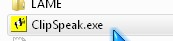
1. Open Clip Speak 1.5
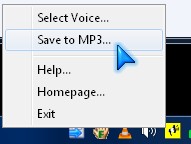
2. Right click the Yellow CipSpeak 1.5 icon on your system tray, and select “Save to MP3”
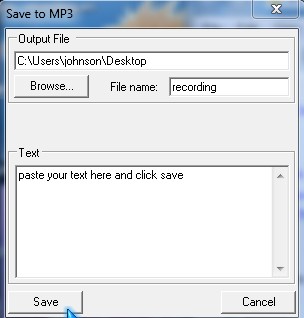
3. Paste in your text, give your file a name and pick the location to save it to. Lastly, Click the Save button.
4. Open the file in the folder you saved your MP3 to.
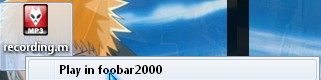
I recommend Foobar2000 since it is a great Audio player. It uses very little system resources, and it is fast.
FooBar2000.org/
I also use foobar 2000 and your right it is super fast
Awesome, Foobar2000 is my favourite Audio playing program for Windows. I agree it is super fast and seems more stable then Winamp and a lot better then Windows Media Payer.
Thanks for the comment Mike!
Thanks for the tip. I will try it.
I have some experiences with text to speech software programs, I am now using Panopreter (http://www.panopreter.com). When I have a long story to read online, I always enable panorpeter toolbar, so I can listen to the vocal speech to avoid eyestrain.
Thanks for sharing the link to panapreter. I think it is a great idea to copy and paste blog posts and convert them to MP3 or an audio file format and play it on an MP3 player since it can take a long time to read some of those 1000+ word blog posts.
This post is very nice and useful for mp3 creation and play it on an mp3 player i never heard and lacking before to convert text to speech and save them as mp3 files with using ClipSpeak. this is one of the best articles. good tips
I agree using ClipSpeak can save you a lot of money since Audio books are not cheap. Plus, with Wikipedia, and other free wiki sites, you can make a custom Audio book about a certain topic instead of buying audio based books which can be expensive.
Thanks for the comment!
You can easily just hire a voice artist for a couple hours, and that would give your audio book a much more unique tone (pun intended!) as well as being still cost efficient.
This is a pretty good idea. Hiring a voice actor for an Audio Book for an Ebook. It sure beats listening to a computerized voice which sounds boring in many cases. Plus, the book will be easily accessible for the visually impaired listeners.
such a great tool:) with its help I could record anything I type, right? That’s just amazing!
Thanks for post!