<<Back to Computer Repair + Web design Blog | Computer Topic Categories

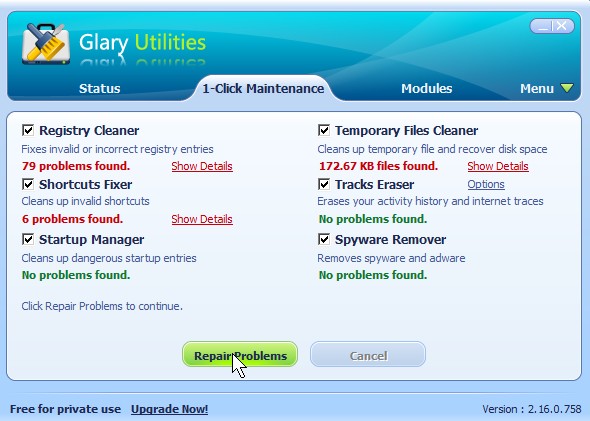
Delete unwanted junk files, remove unwanted registry keys, remove useless shortcuts, remove spyware/malware, and protect your privacy with one click of the mouse with Glary Utilities System Utility

Glary utilities

Glary utilities

http://www.glaryutilities.com/
Glary Utilities is free and I been using it for a few months to delete unwanted junk files, remove unwanted registry keys, remove useless shortcuts, remove spyware/malware, and protect your privacy with one click of the mouse . I also like the Registry defragmentation tool. The Duplicate file finder, and Memory Optimizer is also very useful. It also help me clean up my right click menu. It is a great all in one maintenance program. There are many more features built into Glaries that will take too long for me to explain. It is free, and you have nothing to lose.

Share and Bookmark:
  • Digg
  • Yahoo! Buzz
  • Facebook
  • Twitter
  • StumbleUpon
  • Reddit
  • del.icio.us
  • Slashdot
  • FriendFeed
  • MisterWong
  • LinkedIn
  • NewsVine
  • Propeller
  • Google Bookmarks
  • Yahoo! Bookmarks
  • Add to favorites
  • RSS
  • email
  • PDF
  • Print

More Related Tech Posts:

About Johnson Yip

I graduated from Vancouver Community College's Information technology Specialist certificate program in 2008 and became Comptia A+ IT Enterprise technician certified in 2009. I volunteer at a non-profit Computer Recycler and Refurbisher called Free Geek Vancouver. My interest includes computers, gadgets, art, movies, food, television, blogging, forums, websites and Video games. Welcome to my blog on computer, hardware, software, web design, and cms help. Enjoy your stay!
This entry was posted in Computer, Computer Tutorials, Local PC security, Microsoft Windows, Online Internet Security, Operating Systems, Security, Software, System Utilities, Tutorials, software tutorial and tagged , , , , , , . Bookmark the permalink.

Leave a Reply

Your email address will not be published. Required fields are marked *

*

You may use these HTML tags and attributes: <a href="" title=""> <abbr title=""> <acronym title=""> <b> <blockquote cite=""> <cite> <code> <del datetime=""> <em> <i> <q cite=""> <strike> <strong>

CommentLuv Enabled

Spam protection by WP Captcha-Free