≡ Menu
All In One SEO post meta tag

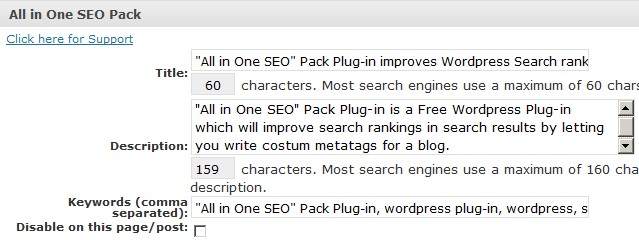
Do you want to easily customize the Meta tag for your WordPress Blog? “All in One SEO” Pack  is a free Plug-in which lets you write a optimize custom Wordpress post title, description for your blog’s posts, pages, and homepage.

For example, it tells you when you go over the 60 character limit for the title, and the 160 character limit for the description for your posts. Most search engines only display a maximum of 60 characters for the title, and 160 characters for the description.

However, there is not a keywords limit for the Keywords, but I recommend around 10 keywords or less which are most relevant for your posts.

Having a custom relevant title and description for all your blog post can make search engines index your page better, and might make users more likely to click on your search result instead of your competitors since your title and description sound better.

My Favorite feature is it can auto generate descriptions, and keywords for your posts you made before you installed “”All in One SEO” Pack which can save you a lot of time if you have hundreds to thousands of posts and pages on your WordPress blog.

I have been using All in One SEO pack for a few months and it works great, and is easy to use.

Click Here to learn more about All In One SEO for WordPress and see screenshots of it.

1 comment

Facebook Like for WordPress
Do you want to make it easier for readers with Facebook accounts to “Like” or share your blog posts with their Facebook friends? I have been using the Facebook Like Plug-in for a few days and it works pretty good at making it easy for readers to share my posts with their friends on Facebook.

The advantages of using the “Facebook Like” button on your WordPress blog are “you can reach more people since when someone likes a website with “Facebook Like”, their friends can see what they like, and friends who are bloggers and webmasters might decide to link back to your article on their blog or website which will give you more traffic, and more backlinks. This can increase your search rankings in search engines since sites with a lot of external links from quality sites usually rank higher then sites with very few backlinks, and the Facebook like button is not too big like other social bookmarking plug-ins.

The main advantage is being to use “Facebook Like” to meet new people with similar interests on Facebook since they will be more likely to return to your blog and become loyal readers. You’ll also will have an easier time gaining people’s trust since Facebook is a very personal social network. For example, most friends on most members Facebook have a relationship with other friends on Facebook in real life like co-workers, school friends, neighbours, and family, so Facebook members which see their friend “like” your articles a lot will see your blog as a safe and trustworthy source for information since they trust their friends opinion on “liking” your articles on Facebook.

Plus, making it easy for your readers to “FB Like” your post can provide a useful service for them by making it easier for them to keep track of what content they read on the web, and make it easier for your readers to provide useful informative content to their Friends, Family, and other members on Facebook if their “Likes” are set to Everyone in their Facebook Privacy settings.

Click Here to learn how to setup and change settings for Facebook Like WordPress Plug-in

0 comments

Do you wanted to make it easier for visitors to bookmark your articles on Digg, Twitter, Stumbleupon, Facebook, and other Social Networking sites which has an social bookmarking option.  By people social bookmarking your articles, you make it easier for readers to access your articles which they have bookmark to their Digg, Twitter, or Facebook profile, and you’ll get more referring traffic to your blog articles via Digg, Reddit, Twitter, Facebook, and other social networking sites with social bookmarking enable.

You’ll also help members on social networks submit your link faster, since they can just click on an image link for Digg or some other social media site, and your article link is submitted to Digg.

Most importantly, you’ll get back links to your articles which can improve your blogs search rankings when people use Search engines to look for a specific category which your article is about. Plus, it increases the chance another blogger will link back to your article from their blog, or website which gives you even more back links, and them a valuable resource for their readers.

I have been using Sociable which is an All-in-One Social Media Bookmarking plug-in for a few months, and it works great at making it easier for readers to Digg, Tweet, Facebook recommend, and bookmark my site on popular Social Media sites.

Sociable has been great, it allows me to add a link for readers to social bookmark my site on many different social networking sites, and I do not have to install a lot of social media plug-ins for my site. 
Read my experience and tips on using Sociable Social Bookmarking Plug-In for WordPress

2 comments
