
By deleting your post revisions in WordPress. You will  make the file size of your wordpress MySQL database file smaller while keeping all your current posts on your blog.
By deleting your post revisions in WordPress. You will  make the file size of your wordpress MySQL database file smaller while keeping all your current posts on your blog.
Backup your database before doing anything to your database.
Optimizing and repairing your database can make it use less space on your web server’s hard drive and repair common problems with mySQL databases.
1. Login to your MySQL Database with phpmyadmin, and click on the tables you want to optimize on the left side on the navigation bar. Click on the top most table link which is the name of your database to choose all tables.
2.Scroll to the bottom of the page, and click the “check all” check box.

Check All
3. from the drop down menu box on the left pick Optimize.

Optimize
4. Your database should be optimized now.
To repair your MySQL database in PhpMyAdmin, you pick the repair option in the drop down menu instead of Optimize after you click the check all link.
1. Click on phpmyadmin for the database you want to back up.
2. Click on the Export link.

3. Select the zipped circle buttun and click the Go Button. Save the file to your computer.
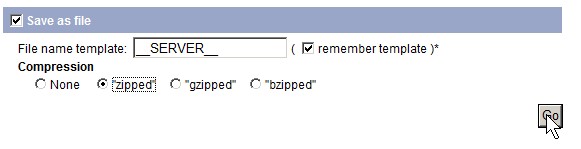
click go
 If you use phpBB, wordpress, joomla, drupal, etc, there are plugins available to make your database backups easier to do.