by Johnson Yip
on October 7, 2009
Audio Extractor
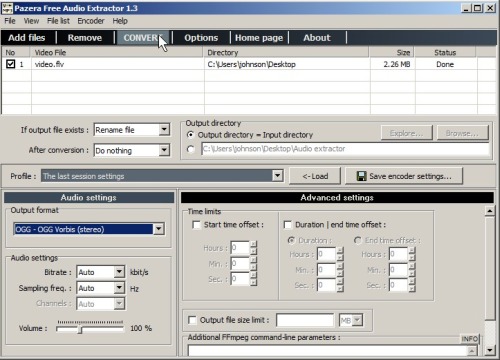
Pazera Free Audio Extractor 1.3 can extract audio from AVI, FLV, MP4, MPG, MOV, RM, 3GP, WMV, VOB and other video files and convert them to MP3, AAC, AC3, WMA, FLAC, OGG or WAV sound file formats. It is very easy to use all you have to do is drag your video to the Audio extractor list window and click the convert button. It is also very fast it only takes a few seconds to extract a 4 minute video clip. The more advance users can adjust the output file type, Bitrate, Sampling frequency, Channels, playback volume, playtime duration, and file size limit. The quality of the sound file that is created is good. What I like most about the software is that it does not require you to install it, all you have to do is unzip the compressed folder and run it within your folder meaning you can take it with you on a usb flash drive. It is a great product for people who want to rip songs from their kids concert recital videos they recorded over the years, so they can listen to it on their MP3 player.
Download Audio Extractor at http://www.pazera-software.com/products/audio-extractor/
Tagged as:
extracting music,
mp3,
Pazera Free Audio Extractor 1.3,
ripping,
sounds,
videos
by Johnson Yip
on October 7, 2009
in
Computer,
Computer Tutorials,
Hardware Tutorials,
Internal PC Parts,
Microsoft Windows,
Operating Systems,
Peripherals & Accessories,
Software,
software tutorial,
System Utilities,
Tech Tutorials,
Videos, Sound & Picture programs
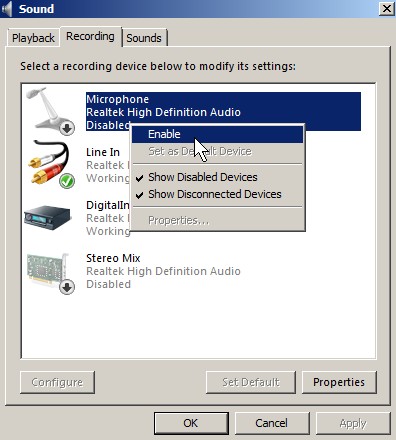
Learn how to turn on disabled sound devices in Micosoft Windows Vista Operating System in the Sound Control Panel Program, so you can use the devices like microphones, line-in jacks, speakers, etc again.
Click the link to read my tutorial on enabling disabled playback and recording sound devices.
[continue reading…]
Tagged as:
app,
application,
devices,
disable,
enable,
microsoft,
ms,
playback,
program,
recording,
Sound/Audio,
windows Vista
by Johnson Yip
on October 7, 2009
- CCleaner
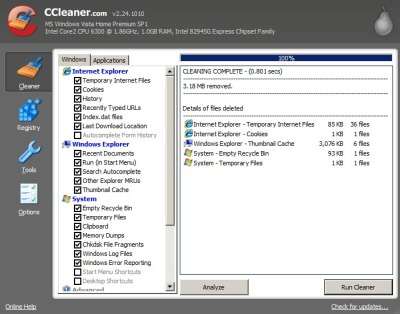
CCleaner 2.24.1010 removes unwanted junk temporary files, and history files that get created when you start programs like Internet Explorer, MS Office, Windows Media Player, etc. By deleting junk files you don’t need anymore you can have more free space to store other files like Songs, videos, photos, and docs. Using CCleaner is very simple to use. All you have to do is click “Run Cleaner button”, and CCleaner gets rid of all the junk files for you. It also has an option for you to wipe free space, so that deleted files are harder to recover with data recovery software.
[continue reading…]
Tagged as:
cleanup,
disk utility,
Free Disk cleanup,
Junk file removal program,
Piriform CCleaner 2.24.1010,
review,
system tools