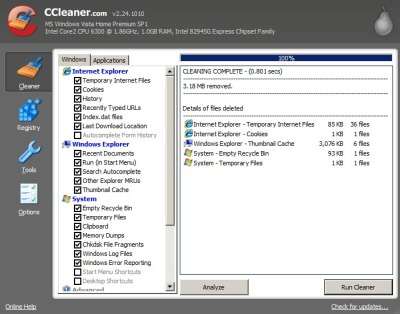
- CCleaner
CCleaner 2.24.1010 removes unwanted junk temporary files, and history files that get created when you start programs like Internet Explorer, MS Office, Windows Media Player, etc. By deleting junk files you don’t need anymore you can have more free space to store other files like Songs, videos, photos, and docs. Using CCleaner is very simple to use. All you have to do is click “Run Cleaner button”, and CCleaner gets rid of all the junk files for you. It also has an option for you to wipe free space, so that deleted files are harder to recover with data recovery software.
CCleaner also includes a registry cleaner to clean your registry, Software Uninstall Wizard to remove software from your computer, Startup Wizard to turn-on and turn-off programs you want to start up during Windrows Start up or not, and a System Restore remover for removing Restore points. It is also very easy to change the options for CCleaner because the settings are very well documented. CCleaner also backs up the registry before you delete the unwanted keys, so you can restore the keys if your PC becomes unstable. Piriform makes a very good product which is very safe to use since I been using CCleaner and it never cause problems with my PC after it deleted junk files. In fact, It made my computer have more space for more important files like my photos. It also help protects my privacy by deleting my history on my web browsers, and recently open files in varies programs, so people can’t easily find out what things I been browsing on my PC.
You can download it at CCleaner.com
This is a great bit of software which does exactly what it says on the tin.
.-= Andy´s last blog ..CC Cleaner =-.
Indeed, CCleaner is a great piece of software. It works wonders at cleaning up junk files and junk registry files on your computer which runs on Windows. I save over 100-300MB of space everytime I use it.
One of the best things about CCleaner is that its FREE. Another thing that makes CCleaner a must-use registry cleaner for windows is its dual scan system. It also locate/detect errors efficiently and cleans your system effectively.
I normally just use Auslogics Registry cleaner, Thanks for the comment Meena.