Pretty good advice. Though, he should be using an anti-static wristsrap when working inside the computer, and placing the motherboard on a anti-static mat instead of the table since Motherboards can be damage by static if the table has static. Plus, computer parts contain lead and other toxic metals which are not good if it contaminates your food, or drinks. I like his Power Supply tester that he got for 20 dollars. He also talks about testing RAM, CPU, and taking out all the expansion cards which is good advice. The best advice is testing the motherboard outside of the computer case. Good job MN12BIRDÂ for making such a good video on fixing a dead PC. The PC looks like an older eMachine.
A password protected user account prevent other non-administrative users from easily viewing your private files, or uninstalling & installing programs on your computer. It also prevents viruses and spyware from easily  infecting your computer. It can prevent your kids, and non-tech savvy users from messing up Windows. You can also make an extra administrative account, so if you could not log in to your main admin. account because you forgot the password or someone changed it, you can use your backup admin account to log in, and change your main admin accounts password.
Note: You need to be login as an admin or super user to be able to make an user accounts.
Click the Link below to learn how to make a User Account in Microsofts Windows Vista Operating Systems.
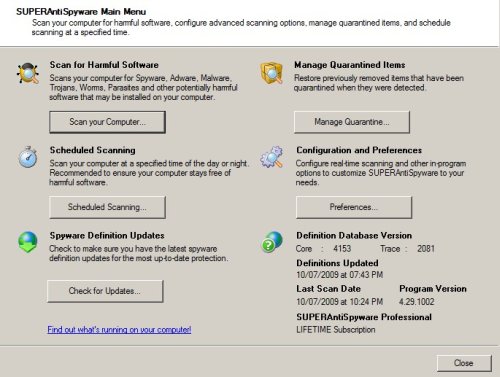
SuperAntiSpyware
Their website is at SUPERAntiSpyware.com. Go there to download the free version,  purchase a license for SUPERAntiSpyware, or learn more about SUPERAntispyware.
You can also buy SUPERAntiSpyware Professional Edition 4.44 2-user License Lifetime Subscriptionat Amazon.com .
About SUPERAntispyware
The free version of SUPERAntiSpyware uses the same spyware engine as the paid version, but the paid version has automatic updates, spyware scan scheduling, real-time protection shield to protect my PC from the latest spyware threats, and varies other tools to restore web browser & system settings that spyware might of disabled or changed.  SUPERAntiSpyware update their definitions on a regular basis, and only focus on spyware instead of all threats like viruses, spam, etc. Their company is very effective at finding and getting rid of the dangerous spyware by focusing most of their resources on protecting PCs with SUPERAntiSpyware from harmful spyware like root kits, executable files which can steal user names, passwords, and confidential information. They also detect and remove the minor spyware too like tracking cookies and spyware registry keys which is not as big of a threat compared to root kits, and spyware applications. Also, check out their online scan which will detect and remove over 1,000,000 spyware/malware infections. It won’t install anything on your computer, so you would not need to uninstall it when you are done using it.
Click the link below to read my review and tutorial on using SUPERAntispyware.