≡ Menu
Save your money on the Comptia A+ exam. Why pay full price?

Save money on the Comptia A+ Cert. exam. Why pay full price?

The Comptia A+ is a good beginner certification for someone who wants to work in a help desk, a computer repair shop, basic networking, or a place that sells computers. The A+ cert. is similar to a certificate you get for passing a course in a Community College, but anyone can take it with no computer experience necessary, but it is not recommended since if you do not study for it. You have a higher chance of failing then someone who has studied the objectives thoroughly, and have hands on experience with repairing PCs. When you pass the A+ exam, you can write it on your resume that you are A+ certified. The A+ exam won’t land you a job. But, it will increase your chances of landing an interview compared to someone who is not A+ certified and have the same amount of experience as you. It is also important to write a professional looking resume, and gain invaluable experience by volunteering, interning, working, and fixing computers. Also, during your interview, be friendly and stay calm.

Important dates:February 28, 2010 is when the 2006 version of the A+ exam will retire, and the Educational version of the exam will retire on August 31, 2010, so quickly make your apointment for taking your 2006 A+ exam.

Source:: Comptia

Learn my secret on saving a significant amount of cash on getting A+ certified by clicking the link below.

[continue reading…]

0 comments
file window

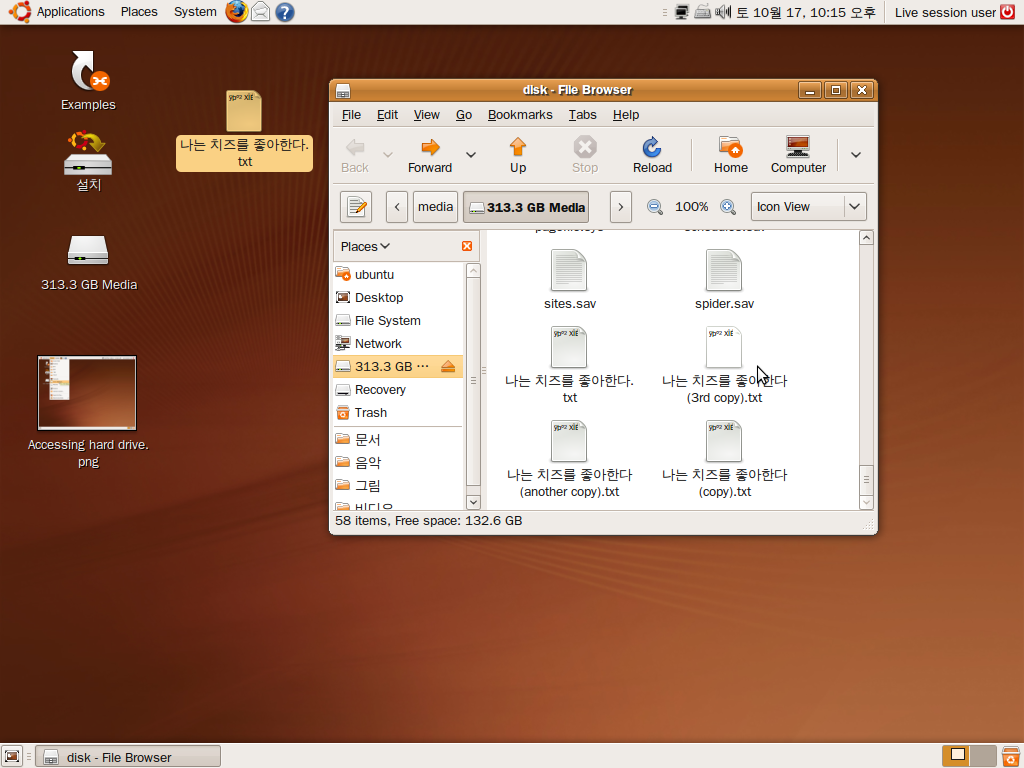
On rare occasions, Windows does not start up normally, or can’t start up using safe mode by pressing F8 during your computer start up event, and you do not have the Windows CD to install or use the recovery console. Maybe you never learned how to use the recovery console.  This is also useful for Linux computers which fail to start up as well.
The same method can be use to recover your files from a computer you forgot your login name and password  or your disgruntled kid, spouse, or employee decided to change your password and login name to seek revenge.  Unfortunately, If you encrypted your files with file encryption then you probably can not recover your files easily unless you have the password for the drive. But, encryption is rare on drives that are used in home computers.

What you will need? A CD-ROM drive on your computer, a copy of a Linux Live CD, and a external hard drive, or separate hard drive already installed on your PC.

Learn how to save all your important files by clicking the link below.

[continue reading…]

4 comments
Is your computer a useless brick? Read tips on making it unbricked.

Is your computer a useless brick? Read tips on making it unbricked.

Remember to wear an anti-static wrist strap and connect it to the metal case on your computer to prevent static discharge from damaging your computer.

1. Make sure the computer is plugged in and the power supply switch at the back is on.

2. Make sure the power supply 20 or 24 pin connector is plugged in tightly to your computer. You may need to plug in a 4 Pin motherboard power plug if you own a Intel Pentium 4 CPU computer or a newer AMD PC.

3. Unplug all your hard drives and cd/dvd-rom drives.

4. If your computer has a video card, plug your monitor into the video card instead of the mother board’s video plug since the user might of disabled the onboard video.

5. Remove all expansion cards except for the video card.

6. If you have more then 1 stick of RAM, remove the extra RAM. (make sure ram is properly seated)

7. Plug a monitor, keyboard, and power cord into the computer. Press the pause/break button on keyboard if you need to see the startup options.

8. If your computer does not start up, try replacing the power supply.

9.If your computer starts up, but makes a continuous beeping sound try re seating the RAM, or replacing it.

Check to see if the power switch for the computer is plugged into the motherboard.

More Advance strategies for fixing your broken computer are available at the link below.

[continue reading…]

0 comments