by Johnson Yip
on November 28, 2009
in
Computer,
Computer Tutorials,
File Backup Imaging Recovery,
Hardware Tutorials,
Microsoft Windows,
Operating Systems,
Peripherals & Accessories,
Software,
software tutorial,
System Utilities,
Tech Tutorials
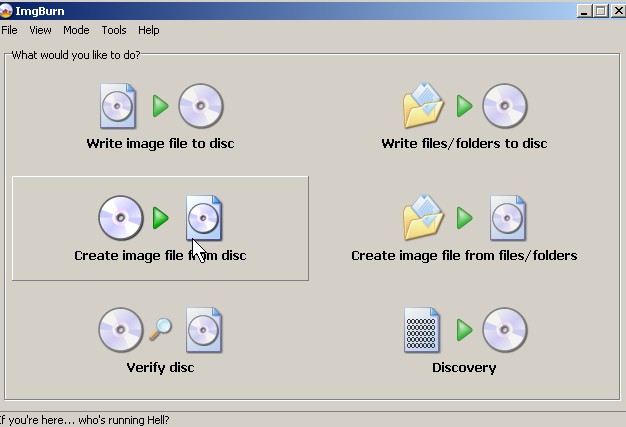
You want to back up your Operating CDs or other types of CDs and DVDs on your computer to keep them safe, or use the ISO file to use to install Ubuntu or Windows on your Virtual Machine software like Virtual PC. The first step to doing this is using software like ImgBurnto make an exact data clone of your CD and save it as an ISO file. Img Burn is easy to use and fast. It also has a very clean user interface. I choose to use my Ubuntu 9.04 CD to make the ISO image.
Tutorial for making an CD ISO image file from an CD with ImgBurn
Tagged as:
back up,
cd burning,
cd image,
image,
imaging,
imgburn,
iso,
iso cd burning
by Johnson Yip
on November 28, 2009
in
Computer,
Computer Tutorials,
Hardware Tutorials,
Internal PC Parts,
Microsoft Windows,
Operating Systems,
Peripherals & Accessories,
Software,
software tutorial,
System Utilities,
Tech Tutorials
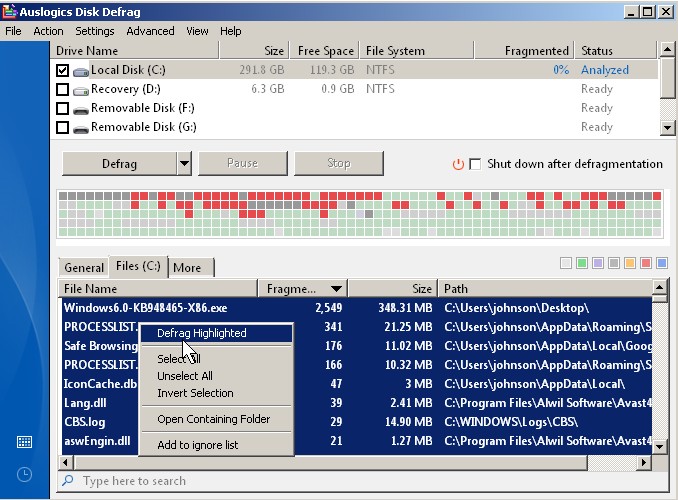
Defragging a hard drive can take a long time depending on how big or fast your hard drive is. But, with Auslogic Disk Defrag which is free and easy to use. You have the choice of just defragging fragmented files, or one file to save time . This is useful if you are video editing. If your video file is not fragmented, it won’t take as long to encode your files since your read and write hard drive head does not have to move as much to read your file.
Tutorial for defragraging only fragmented files in Auslogic Disk Defrag
Tagged as:
defrag,
defragmentation,
defragmented,
software tutorial
by Johnson Yip
on November 26, 2009

Commenting is an important part of blogging since it lets the blogger and readers get to know each other, or talk about relevent information on a post like a forum. However, most people who post on blogs are not registered members since many people are too lazy to join or can’t find the link to join your blog. Comments also make your blog more active, so search engines might visit your site more since it has fresh comment content.
Enabling guest commenting is not a good idea if your blog gets a lot of hateful or spammy comments from guests. Akismetis a good plugin for stopping spam from showing up on your blog, but you have to register for a Akismet key at http://wordpress.com
WordPress by default does not let unregistered guests commenent, but you can change this
Tagged as:
blog commenting,
commenting,
guest commenting,
wordpress,
wp