
Having a most viewed add-on for a blog can help you keep track of which posts on your blog is doing well. Plus, it can improve the user experience on your blog by using a “most popular Post” plug-in on your blog. New users will know which post are most popular, and they might be more interested in viewing it because it is so popular. Some users might be more interested in commenting on your posts if they know it has a lot of visitors per day, and it is linked to your front page. If the commenter leaves a comment with their Website link in the Link text box, they can get additional traffic by commenting and linking their site on your most viewed posts vs on your less popular posts. Also, some people believe popular posts can be better quality then unpopular posts since having a lot of views may make your article more trustworthy like Digg.com where Websites which are Digg more seem more worthy to read since so many viewed them.
 I’m currently a Wordpress Popular posts Plug-in to automatically display my most viewed WordPress Posts on this blog to make my blog feel more interactive and less static. The Most Viewed Plug-in is a Widget which you can add to your sidebar in the Widget section of WordPress.
I been using this plug-in for a week, and it has worked great at displaying my most viewed posts.
The user can change the title of the “most viewed” widget in the sidebar, and tell the plug-in to display how many post links in the sidebar, time range of most viewed posts, and many other features. The plug-in also displays and format the output text for the Popular Post Sidebar Widget plug-ins.
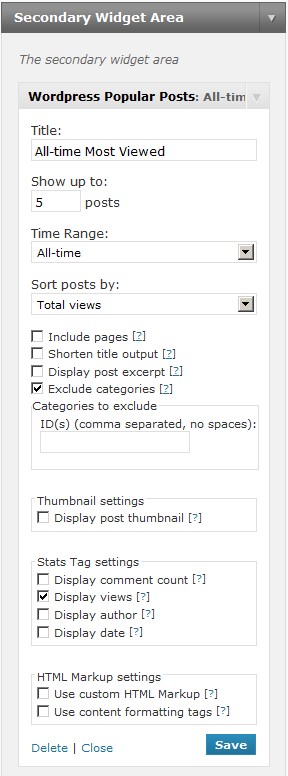
What I like about using Widgets is I don’t risk breaking my sidebar, or blogs since I don’t have to edit my sidebar. The Secondary Widget Location is best for my blog. I love this widget. It is so easy to use. All you have to do is install it, configure the Popular Post Widget, and let it run. Plus, it does not slow down my blog like other widgets I used.
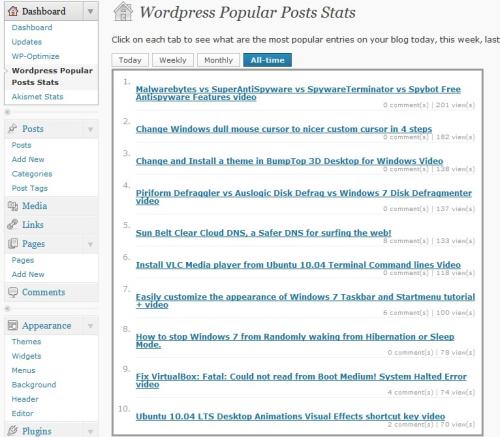
WordPress Popular Post Widget also has a stats counter built-into the Dashboard panel. It displays Todays, Weekly, Monthly, and All-time most popular views. It also shows you the amount of views and comments each posts has. This can save you a lot of time since you no longer have to log-in to a website analysis service like Google Analytics to see your most viewed articles for the day, week, month or all time. You can also use the statistics for article ideas. For example, I have a lot of views on posts related to desktop customizations (wallpaper, icons, screen savers, themes,etc), so I should think of writing more articles about computer desktops since I have many readers who read my desktop related posts.
This may also increase your Search Engine Optimization results since it is best to link and showcase your best content for search engines and users, so users will more likely link back to your useful articles, and the user will less likely to only visit your site once per visit since something in the most viewed section in your sidebar might interest them, so this can lead to a decrease in bounce rate.Â
Note: You need to wait a few hours or days until your most popular posts start showing up on Popular posts Plug-in sidebar widget. The widget does not calculate your old views. It only starts counting views since the widget only can calculate article views since the widget is installed.Â
You can download this plug-in at wordpress.org/extend/plugins/wordpress-popular-posts
Informative blog about the word press 3.0 most viewed blog post plugin.
Hi Abdul, I’m glad you found the information you are looking for on “WordPress 3.0 Most Viewed Blog post plug-in”